Why Is My PC So Slow? 8 Checks You Can Do Yourself (and What Each Fix Costs)
Slow PC or laptop? Eight checks you can do in Task Manager in 10 minutes, what each problem costs to fix in South Africa, and when an upgrade beats buying new.
2026-10-11
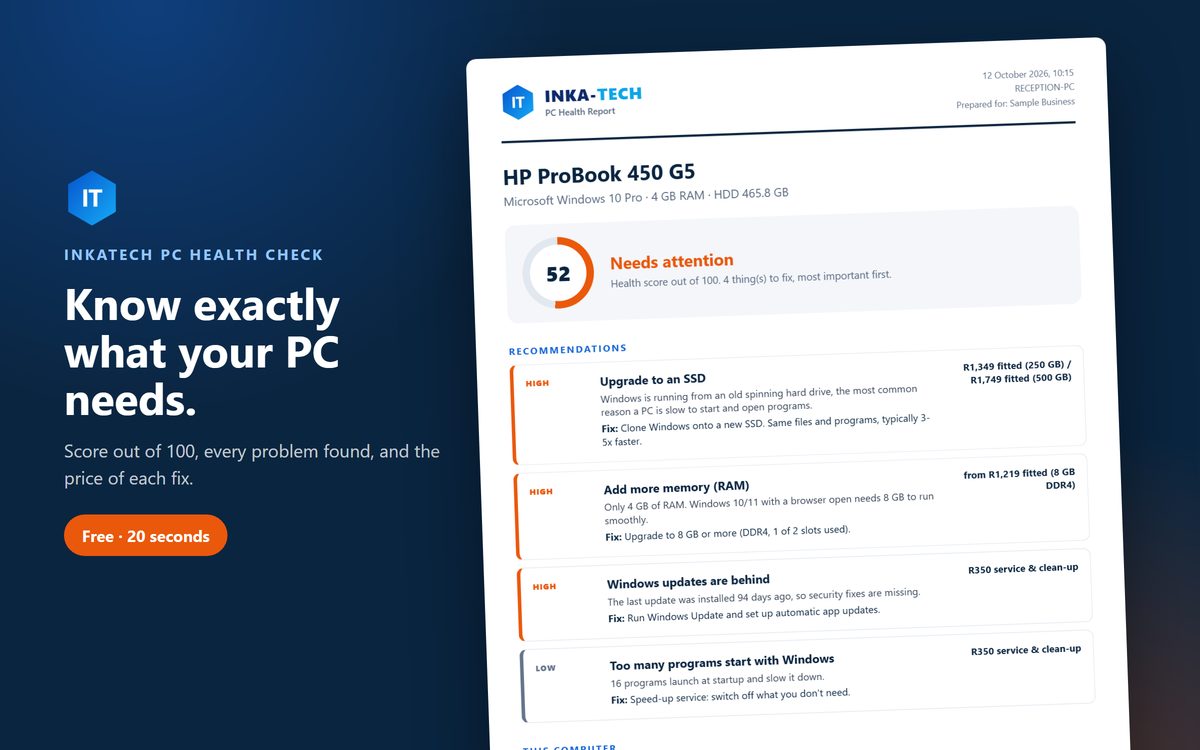
Your PC takes three minutes to start. Chrome freezes when you open a second tab. The fan sounds like a hairdryer. Before you spend R8,000 on a new laptop, it's worth knowing that most slow computers in South Africa have one of a handful of problems, and several of them cost less than R1,500 to fix.
This guide walks you through eight checks you can do yourself in about 10 minutes, using nothing but Windows' own Task Manager. For each one, you'll see what it means and roughly what the fix costs.
Short on time? Download our free PC Health Check. It runs all of these checks in about 20 seconds and gives you a PDF report with a score out of 100 and a price for each fix. Nothing is installed and nothing is sent anywhere.
How to open Task Manager
Press Ctrl + Shift + Esc. If you only see a small window, click More details at the bottom. Most of the checks below use the Performance and Startup tabs.
1. Is Windows running on an old hard drive?
This is the number one cause of a slow PC we see in Pietermaritzburg, and the cheapest big improvement you can buy.
How to check: in Task Manager, go to Performance and click Disk 0. The top right says either SSD or HDD. You can also search the Start menu for Defragment and Optimize Drives, which lists the media type of each drive.
What it means: an HDD is a spinning hard drive. If Windows runs from one, and the Disk graph sits at 100% for minutes after you switch on, the drive is the bottleneck. No amount of cleaning will fix that.
The fix: clone Windows onto an SSD. You keep all your files, programs and settings. A PC that took three minutes to start usually starts in under 30 seconds.
Cost: about R1,349 fitted for 250 GB or R1,749 for 500 GB, including cloning.
2. Is there enough memory (RAM)?
How to check: Performance > Memory. Look at the total at the top right (4 GB, 8 GB and so on) and the "In use" figure while you have your usual programs open.
What it means: Windows 10 or 11 with a modern browser needs 8 GB to run comfortably. On 4 GB, the PC constantly swaps memory to the drive, which feels like everything is wading through mud. If "In use" is regularly above 80%, you're short of memory.
The fix: add a memory stick. Task Manager also shows Slots used (for example "1 of 2"), which tells you whether there's room to add one rather than replace one.
Cost: from about R1,219 fitted for 8 GB DDR4. Prices depend on the memory type (DDR3, DDR4 or DDR5), and memory prices have risen sharply in 2026.
3. Too many programs start with Windows
How to check: the Startup tab (in Windows 11, Startup apps). Look at the "Status" and "Startup impact" columns.
What it means: every program set to "Enabled" loads when you switch on, whether you use it or not. 15 to 20 is common on a PC that's a few years old: chat apps, game launchers, printer tools, update checkers, Canva, Spotify, Edge "auto-launch".
The fix: right-click anything you don't need straight away and choose Disable. It isn't uninstalled. It just waits until you open it. Leave your antivirus, OneDrive, touchpad, audio and graphics drivers alone.
Cost: free if you do it yourself.
4. Is the main drive nearly full?
How to check: open File Explorer > This PC and look at the bar under drive C:.
What it means: when C: has less than about 15% free, Windows slows down, updates fail and some programs crash. The Downloads folder is usually the culprit: years of installers, videos and duplicate PDFs.
The fix: clear out Downloads, empty the Recycle Bin and run Disk Cleanup (search for it in the Start menu). To stop it filling up again, our free PC Tidy sorts Downloads and the Desktop into folders every week, which makes it obvious what can go.
Cost: free.
5. Are Windows updates stuck?
How to check: Settings > Windows Update. Look at the date of the last successful update and whether anything says "pending restart" or "failed".
What it means: a PC that hasn't updated in months is missing security fixes, and a stuck update can keep a background process busy for hours.
The fix: restart, then click Check for updates and let it finish while the PC is plugged in. If updates keep failing, the drive is often too full (check 4) or failing (check 1).
Cost: free, unless updates are failing because of a deeper problem.
6. Is something running that shouldn't be?
How to check: the Processes tab. Click the CPU column to sort by usage. Anything you don't recognise using a lot of CPU while you're doing nothing is suspicious.
What it means: malware, crypto-miners and "PC optimiser" adware all slow a PC down. Also check Windows Security > Virus & threat protection to confirm real-time protection is on.
The fix: run a Full scan in Windows Security. If it finds something it can't remove, or the PC still runs hot when idle, get it looked at.
Cost: free to scan; professional virus removal usually costs R350 to R750.
7. Is it overheating?
How to check: listen and feel. A fan that roars during simple tasks, a laptop too hot to rest on your lap, or a PC that slows down after 20 minutes but is fine when cold all point to heat.
What it means: when the processor gets too hot, it deliberately slows itself down to protect itself. Dust-clogged fans and dried-out thermal paste are the usual causes, especially in laptops older than three years.
The fix: a proper internal clean and new thermal paste. Don't blow compressed air into a laptop's vents with the fan spinning; it can damage the fan.
Cost: usually included in a service. Ask for a quote for your model.
8. Is the battery worn out? (laptops)
How to check: open Command Prompt, type powercfg /batteryreport and press Enter. Open the file it mentions and compare Design capacity with Full charge capacity.
What it means: a battery holding less than 60% of its original capacity won't last through a stage of load-shedding, and some laptops slow down to protect a weak battery.
Cost: depends on the model. We quote per laptop.
What each fix costs: summary
| Problem | Fix | Approximate cost |
|---|---|---|
| Old hard drive (HDD) | SSD with cloning | R1,349 to R1,749 fitted |
| Not enough RAM | Add a memory stick | From R1,219 fitted (8 GB DDR4) |
| Too many startup programs | Disable in Task Manager | Free |
| Drive nearly full | Clean-up | Free |
| Updates stuck | Restart and update | Free |
| Malware | Scan and removal | Free to R750 |
| Overheating | Internal clean | Quoted per model |
| Worn battery | New battery | Quoted per model |
Upgrade or buy new?
If your PC has an Intel Core i5 or i7 from roughly 2015 onwards, upgrading is almost always the better deal. An SSD plus 8 GB of RAM costs about R3,000 fitted, compared with R8,000 or more for a new laptop of similar quality, and you keep everything exactly as it was.
Buying new makes more sense when:
- the processor is a Celeron, Pentium or Core 2 Duo, or more than about 10 years old;
- the screen, hinges or keyboard are also failing;
- you need Windows 11 and the processor isn't supported.
Load-shedding is hard on PCs too
Every time the power cuts while a PC is running, there's a small risk of a corrupted file or a damaged Windows update. Laptops are mostly protected by their battery, but check that Windows is set to hibernate when the battery gets critically low (Control Panel > Power Options > Change plan settings > Change advanced power settings > Battery). On some laptops it's set to "Do nothing", which means the laptop simply dies mid-work. For desktops, a small UPS is the best R1,500 you'll spend.
Keep it fast
Once your PC is running well, three habits keep it that way:
- Keep Downloads tidy. PC Tidy does it for you every Monday, free.
- Keep apps updated. Old versions of Chrome, Zoom and Adobe Reader are a common way in for malware.
- Back up. An SSD is fast but, like any drive, can fail. Keep a copy of your Documents and photos on an external drive.
If you'd rather not think about any of it, our PC Care plan does all three automatically, adds load-shedding protection, and checks in with us every week so we can spot a failing drive before you lose anything. It costs R250 to set up, then R99 a month per PC. See the details.
FAQ
Will an SSD really make that much difference? On a PC running Windows from a hard drive, yes. It's the single biggest speed improvement you can buy. On a PC that already has an SSD, adding another one won't make it faster.
Do I lose my files when you fit an SSD? No. We clone the old drive onto the new one, so Windows, your programs and your files all come across. Your old drive can then be used as a backup.
Is it safe to disable startup programs? Yes. Disabling only stops a program opening automatically; you can still open it whenever you like, and re-enable it in the same place. Leave antivirus, cloud sync and hardware drivers enabled.
Do "PC cleaner" or "driver booster" apps help? Rarely. Many of them run in the background themselves and nag you to pay. Windows' own Disk Cleanup and Task Manager do the useful parts for free.
Is the free Health Check safe? It only reads information about your PC and writes a report to your Desktop. Nothing is installed or sent anywhere, and the scripts are plain text you can open in Notepad.
Get a straight answer
Download the free PC Health Check and you'll know in 20 seconds what's slowing your PC down and what it costs to fix. Then WhatsApp us the report on 074 883 9166 and we'll tell you exactly what we'd do and what it costs.
Don't just read about it
Need PC Health Check, free for Windows? We build it.
Find out in 20 seconds why your PC is slow and what each fix costs. A PDF report with a score out of 100. Nothing installed, nothing sent.
from Free · download · PC Care plan R99/month
Prefer email? nkanyiso@inkatech.co.za · patricia@inkatech.co.za
Keep reading
More guides for your business

How Much Does a Website Cost in South Africa in 2026?
Explore website costs in South Africa for 2026. Discover pricing, factors affecting cost, and how to get a professional website.
Read article →
Website vs Facebook Page: Why Your South African Business Needs Both
Explore why your South African business needs both a website and a Facebook page for optimal online presence.
Read article →